
Notice
Recent Posts
Recent Comments
Link
| 일 | 월 | 화 | 수 | 목 | 금 | 토 |
|---|---|---|---|---|---|---|
| 1 | 2 | 3 | 4 | 5 | ||
| 6 | 7 | 8 | 9 | 10 | 11 | 12 |
| 13 | 14 | 15 | 16 | 17 | 18 | 19 |
| 20 | 21 | 22 | 23 | 24 | 25 | 26 |
| 27 | 28 | 29 | 30 |
Tags
- Algorithm
- 난수
- 패킷
- Jira Slack 연동
- Flutter Network Interceptor
- Swift
- 멀티패키지
- 플러터 인터셉터
- 네트워크
- 인터셉터 구현
- flutter interceptor
- Bitbucket Slack 연동
- Flutter
- 멀티모듈 고 라우터
- 알고리즘
- ci/cd
- Flutter Netwrok Logging
- IP
- Flutter Logging
- Python
- 펍 워크스페이스
- Match
- 플러터
- go_router
- 고 라우터
- 스위프트
- Di
- 단편화
- ios
- pub workspace go_router
Archives
- Today
- Total
INEEDACHACHA
Flutter Cocoapods -> SPM 전환 Trouble Shooting 본문
발단
- 공통 컴포넌트 버튼을 만들던 중 하기와 같은 에러가 발생했다.
- SPM 전환 완료 후 Podfile도 지운 상태였기 때문이다.
- 해당 에러는 pod install을 하라는 에러였다.
- 갑자기 생긴 에러, 2-3개 전 PR의 내용이었고 상당 기간 개발이 진행 중에 생김
Error (Xcode): The sandbox is not in sync with the Podfile.lock. Run 'pod install' or update your CocoaPods installation.


Could not build the application for the simulator.
Error launching application on iPhone SE (3rd generation).
조치 내용 1차 (Pod 다시 생성)
- flutter는 캐시 문제가 워낙 많으니 캐시를 모두 없앴다.
- 조심해야하는 것은 SPM만 쓰더라도 workspace를 지우면 안 된다는 것이다.
- 인공지능은 workspace를 지우도록 유도한다.
- SPM을 비활성화 시킨다.
pubspec.yaml

flutter:
  config:
    enable-swift-package-manager: false
전역 비활성화
flutter config --no-enable-swift-package-managerflutter clean
flutter pub get
flutter run- 이렇게 했을 경우 Pod이 생기면서 에러가 사라진다.
조치 내용 2차 (SPM 수동 이식)
전역 활성화

flutter config --enable-swift-package-manager
pubspec.yaml
flutter:
config:
enable-swift-package-manager: true- 상기의 두 가지로 SPM을 활성화 해준다.
- 그리고 다시 빌드를 하면 아래와 같은 에러가 생긴다.
All plugins found for ios are Swift Packages, but your project still has CocoaPods integration. To remove CocoaPods integration, complete the following steps:
  * In the ios/ directory run "pod deintegrate"
* Also in the ios/ directory, delete the Podfile- pod deintegrate 실행
- Podfile, Directory 삭제
- 이렇게 하면 flutter 상에서는 빌드가 될 것이다.
조치 내용 3차 (Xcode 상에서 빌드)
- 상기의 조치로 인해 flutter 에서는 빌드 성공
- 하지만, Xcode에 들어가서 빌드를 했을 때는 안 됐다.
- Xcode에서 .xcodeproj를 실행해서
- Runner target을 클릭 후 Build Phase -> Link Binary With Libraries로 이동한다.
- 이동 후 'FlutterGeneratedPluginSwiftPackage'가 반드시 존재해야 한다.
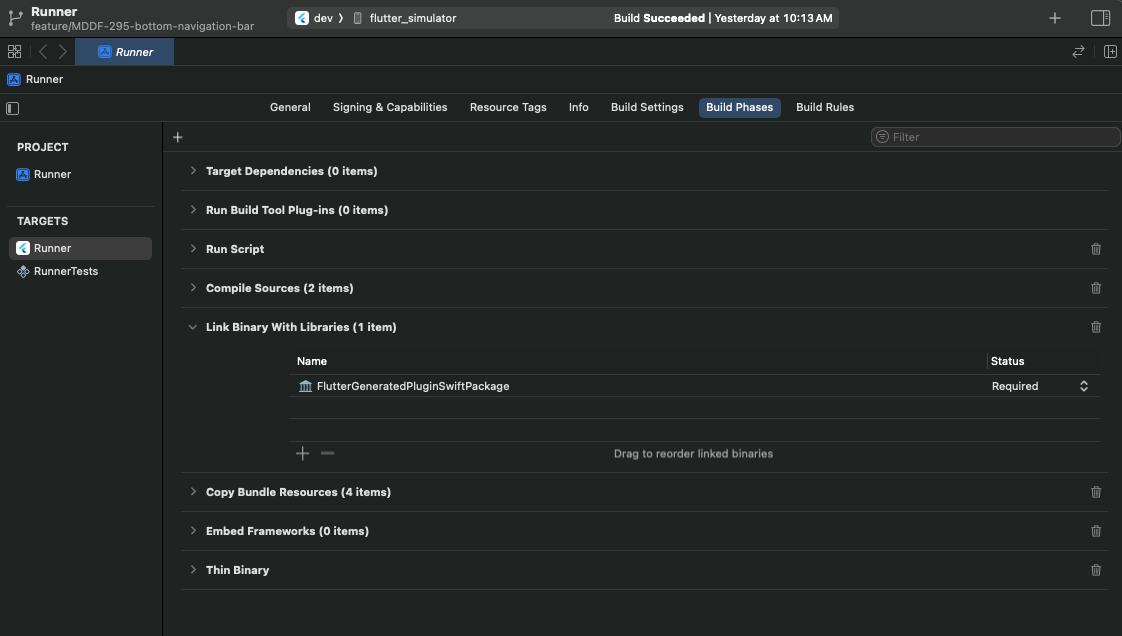
- 사진과 같은 조치가 끝났다면
- CocoaPod에 대한 의존은 없어지고 빌드도 잘 된다.
'Flutter > 전환실록' 카테고리의 다른 글
| Flutter Project Atlassian Setting (0) | 2025.07.23 |
|---|---|
| Flutter Network Logging Interceptor (4) | 2025.07.22 |
| Pub Workspace에서 go_router 기반 네비게이션 시스템 구현 (0) | 2025.07.15 |
| Flutter Pub Workspaces 구조 – 현재 프로젝트 기준 (1) | 2025.07.15 |
| Flutter Network Module => Swift Moya Style로 만들어보기 (0) | 2025.06.13 |
'Flutter/전환실록' Related Articles
more


